I've been a Busy McBusy-son lately, animating up a storm. As well as my Animals and Creatures 2 class (which I will try to remember to post about soon...) I've been working on some new dialogue tests. One of my classmates from last term, who is a super awesome animation supervisor at Nerdcorps in Vancouver gave me some great advice about tailoring my demo reel to studios. I asked him about applying to Nerdcorps which does a lot of work for television, and he suggested that I try animating 3 different dialogue pieces in 3 days-1 day for each shot.
I chose a fairly short clip for the first one, as it has been a while since I last animated a dialogue shot. It turned out ok, I ended up spending a good portion of the day trying to figure out how the handcuffs were going to work though...
questions from Erica Miles on Vimeo.
For the second one I picked a longer clip, with two characters. This one took me a bit longer because of the two characters, one of which being a dog (and a rig I had not used before as well). This one could still use some work (and I haven't had a chance to upload it yet).
For my third shot I picked an audio clip that I've been wanting to animate for a while. I think that this one turned out the best of the three.
Quarter from Erica Miles on Vimeo.
I've definitely noticed myself getting faster working on these shots and I'm going to work on a couple more over the next little while.

Showing posts with label animation. Show all posts
Showing posts with label animation. Show all posts
Saturday, April 27, 2013

Friday, April 12, 2013
AM-Animals and Creatures 1 Week 3-6
Our post walk cycle assignment was to animate a type of quadruped locomotion be it walking. running, trotting, leaping etc. I decided to do a smaller cat, because I thought it would be fun and the majority of the other shots being done were of bigger cats.
I watched a LOT of cat videos on youtube and found a bunch of this adorable little kitten.
http://www.youtube.com/watch?v=WYk07KFWPZ8 (the part that I referenced starts at about 2:08)
Then I did a bunch of thumbnails.
I watched a LOT of cat videos on youtube and found a bunch of this adorable little kitten.
http://www.youtube.com/watch?v=WYk07KFWPZ8 (the part that I referenced starts at about 2:08)
Then I did a bunch of thumbnails.

I wanted to tie in this shot and my third shot is a sort of anim-jam with the cat/kitten walking over and sniffing a sleeping ogre, then end up playing around the ogre and jumping on him-waking him up.
I blocked out the cat prancing/trotting over the ogre (which would be added later). The tail was also hidden in this pass so that I could focus on the rest of the body.
I did a couple of more passes on it and ended up with this more refined version. I also added in some tall grass to make the high steps the kitten is taking more believable.
Monday, February 25, 2013
AM-Animals and Creatures Pt2
Our first assignment actually animating, was a basic quadruped walk cycle. Here are the thumbnail sketches.

And the walk cycle.
It's still a bit 'hitchy', but I learned a lot from it!
Monday, February 18, 2013
AM-Animals and Creatures Master Class Pt1
I started taking the first of two animals and creatures master classes from Animation Mentor at the beginning of January. I thought that it would be a good addition to my character animation skills, and although I wasn't sure at first if it would really be my cup of tea I've found that I actually enjoy it. I've always loved animals, and learning about their anatomy, how they move and why they move the way they do is pretty cool! My mentor for the term is John Nguyen. He's a pretty awesome guy, and has worked for a number of impressive studios and on some pretty awesome projects/films. He's currently working for Disney Interactive Media Group.
Our assignment for the first week was to do a bunch sketches of different types of animals to start honing our observational skills. I made sure to include both a teacup pig and a unicorn in mine.


Our assignment for the first week was to do a bunch sketches of different types of animals to start honing our observational skills. I made sure to include both a teacup pig and a unicorn in mine.
We then had to take the cat rig and do two dynamic poses with it. It was my first time ever using a quadruped rig, and it definitely took some getting used to. Looking at both poses now I can already see a bunch of thing that I would fix.
This last one looks more than a little drugged...
Friday, September 14, 2012
New Shot-blocking
I've started working on a new shot for my demo reel and I thought that I would share what I've done so far! I chose an audio clip from the ridiculous movie Top Secret and set it in a Mad Scientist lab/dungeon. I've only done a couple of passes in blocking and haven't done much with the monster or set yet, but this is what I've done so far!
The first blocking pass
I got some feedback that the monster wasn't reading very clearly lying down on the table, so for the next pass I made him a little easier to see. I also did some more breakdowns for the scientist.
The first blocking pass
I got some feedback that the monster wasn't reading very clearly lying down on the table, so for the next pass I made him a little easier to see. I also did some more breakdowns for the scientist.
Any feedback/comments would be very much appreciated!
Thursday, June 14, 2012
Animation Mentor Class 6?!
Goodness, it has been a long time since I last posted! I have been neglecting my blog terribly... :( The past few month have been crazy, trying to keep up with AM while travelling and being sickly and just regular life stuff as well! Seeing as how tomorrow is officially my last day as a character animation student at AM (which is super sad and exciting at the same time) I've got a whole lot of updating to do in a very short amount of time....Are you ready for it? OK HERE WE GO.
My mentor for this term is the lovely Greg Whittaker! He has worked as an animator at Dreamworks for quite some time and has worked on a lot of their great films! He also worked with Chuck Jones prior to working at Dreamworks which is pretty freaking cool. Greg warned us at the beginning of the term that the 12 weeks would fly by and that we should try to get as much done as possible.
Our assignment for the week was to submit all of our work so far so that Greg could help us narrow down what we might want to put in our demo reels. He also gave us some feedback on where we should go with some of our shots.


Class 6 Week 1
Our assignment for the week was to submit all of our work so far so that Greg could help us narrow down what we might want to put in our demo reels. He also gave us some feedback on where we should go with some of our shots.
Greg wanted me to quiet down the animation in my two person dialogue so that there wasn't an gesture on every accent in the dialogue and so that the audience would be able to focus on the characters face a bit more. Also to help boost the intensity of the shot. He also gave me some notes on animating the line of action in my anim-jam shots.
Week 2
This week I worked on addressing Greg's notes on the first shot my two person dialogue. I really worked on keeping the character in just a few main poses.
Week 3
I continued to work on refining and polishing the first shot in my 2 person dialogue. I also started working on the second shot!
Week 4
More polishing on the 2 person shot this week. I started working on refining the faces a lot as well.
Week 5
I worked a lot on trying to get the last shot working better this week as well as loosening up the animation of the female character in the 3rd shot.
Week 6
After working on the 2 person shot for what felt like a bajillion years I felt like I needed a bit of a break from it and decided to work on my pantomime shot this week. I added a bit more to the background to help provide a bit more context for the scene and substituted in a modified bishop character for stewie. I also tried to make the change in attitude from bored employee to interested in the customer employee read a little better.
Week 7
I replaced the girl stewie and the naked boss with new modified bishop characters this week and fixed the camera framing so that everything fit in it better. I also worked on strengthening the change in attitude and on making the snap into position once he notices his boss behind him a little smoother.
Week 8
This week was kind of tough because I was out of town the weekend it was due and so I didn't get to work on it as much a I would have liked. I also forgot to copy his visor file over to my laptop so he was without his hat this week. Greg wasn't a fan of my very over the top, head whipping take so he suggested that I try to make the change in attitude even clearer and get a good straight in the pose where he really notices her. I also worked on his face a bit and some very basic blocking of some movement for her.
Week 9
I wanted to get some feedback on my single character dialogue before the end of the term so that I would have some time to implement some of Greg's notes before the class was finished. I worked on pushing the facial expressions a bit more and some overall polishing. I also dressed bishop up and gave him a brick wall to talk in front of! Hurray!
Week 10
Week 10 was a rough week for me. I was out of town from the saturday night of week 9 until the monday night of week 11 so the only real time I had to work on my animation was a few hours sitting in various airports and a little bit of time at night in my hotel room. I was able to get a little bit done, but not nearly as much as I would have liked to. This week we were supposed to get our polishing done on our shots and compile them together with a title and end card for our demo reel.
We also had to do our dvd covers with a shot breakdown to put our demo reels in. I really picked a great week to go out of town, huh? Hahaha.

DVD cover

Disc cover and shot breakdown insert.
Week 11
I was actually home this week! Yay! And boy did I have a lot of work ahead of me... I worked on polishing up all 3 of my shots and trying to cover all of the notes that I wasn't able to the week before.
On the single character dialogue I worked on smoothing out the weight shift and his hand movement, as well as getting the upper and lower portions of the face to feel more connected.
With the pantomime I worked on really differentiating the first bored pose with the suave pose when he's trying to impress her as Greg found them too similar. I also worked on smoothing out his hands and added a bit more to the female character.
In the 2 person shot I focused a lot on making the upper and lower portions of the face work together better and getting some more squash and stretch in the expressions. I also worked on pushing the anticipation for and the actual point at the bookshelf for the female character and the animation in the last shot overall.
Last week Greg said that he really like my dvd cover and that it looked very professional. He just had a couple of notes regarding the spacing of the back cover and the design of the insert which I worked on fixing this week.


Friday, March 23, 2012
Animation Mentor Class 5 part 3
Week 8
I did my first rough pass on the lip sync this week and I worked on pushing my poses.
Week 9
I started working on my second character!!!! I also continued to work on refining my first shot.
Week 10
More polishing and pushing the animation overall. I hid the card in his hand because I had to do some IK/FK witching on the one arm to get the gesture looking more intense and direct. I also worked on the last shot. My computer and maya had a fight though and I ended up losing a lot of work that I had done on the last shot right before I had to hand it in. IT WAS LOVELY.
Week 11
This was the last week that we had to work on our assignment for this term. I had a lot of work to do... I had to finish the last shot, add in a book shelf, re-constrain the card to his hand, fix up a lot of the third shot, and polish up everything so that it was nice a shiny.
I still have a lot of polishing to do overall, but that is what class 6-polishing and portfolio is for!
I still have a lot of polishing to do overall, but that is what class 6-polishing and portfolio is for!
Thursday, March 22, 2012
Animation Mentor Class 5 part 2
For our second assignment of class 5 we got to work on a two person dialogue shot! In week 4 we picked 3 possible audio clips and submitted them to get feedback on which one would be the best option to work on. My computer decided to have a stroke or meltdown or something equally as wonderful this week and the audio on my computer completely quit working. It made it quite difficult to start working on a dialogue assignment... I had luckily picked out a bunch of possible clips way in advance, so I was able to get my assignment in on time.


We also had to do one facial expression pose. I chose one of the lovely Zack Levi.

Week 5
My dad was luckily able to use his computer wizardry to get my computer somewhat up and running again. (yay dad!) We still had to completely wipe my hard drive and re-load everything back onto my computer. I was really glad to have had my portable hard drive to back things up on! The first half of my week was spent trying to get my computer close to being back to where it was, and then the rest was spent on my assignment. I picked clip #2 out of the 3 clips and shot some reference of myself arguing with myself. I think I won.
Then we did a rough layout pass to figure out what our shots would look like and where we would place the cameras.
Then I did some planning sketches.


Peter really liked my reference and planning stuff this week which was pretty cool!
Week 6
We started blocking out our shots this week.
I stayed pretty close to my reference with my initial blocking pass, and the poses weren't terribly exciting. I was still having computer problems this week, but I did my best to get at least a very basic blocking pass on all 4 of my shots so that I could show what my idea was for the whole scene.
We also had to do another face pose.

Week 7
In week 7 I just worked on the 1st shot and tried to get more motion in the body of the character so that he wouldn't look so stiff.
And another face pose! Featuring the fantastic and amazing Angela Lansbury

I did this one as well, but decided to hand in the first one.

I'll post the rest of my work from class 5 very soon!
Wednesday, March 21, 2012
Animation Mentor Class 5 part 1
So I am about to finish class 5 (Advanced Acting) at AM, and I thought that I would update you on all that has happened over the term! My mentor for class 5 was the fabulous Peter Kelly from ILM. He has been there for quite some time and has worked on a number of awesome projects like Rango, Star Wars Episodes II and III, Iron Man, the upcoming Avengers movie and many more! Peter was always great at pushing my work and being super supportive at the same time. Out of all of my mentors so far he has probably had the most passion for animating or even just animation in general, which was really inspiring! Plus he's a super nice guy!
Anyways, for our first assignment of the term we had to take our shot from class 4 and do the facial animation/lip sync on it! We had to film some reference of our face as we said the line of dialogue, then write it out phonetically and to some planning sketches.


Anyways, for our first assignment of the term we had to take our shot from class 4 and do the facial animation/lip sync on it! We had to film some reference of our face as we said the line of dialogue, then write it out phonetically and to some planning sketches.


My planning sketches were a little rough and gross looking but they're just for planning...
Then we did our first pass on the face.
Then, in week 2 we had to use the bishop rig and pose it in two different facial expressions from photos.


We also did our second pass on the face. I worked a little more on the eyes and brows, as well as smoothing out the lip sync a bit more.
In week 3 we had another 2 face poses.


And our final-ish pass on the face.
I also tried customizing the Bishop 2.0 rig so that it wouldn't just be the plain ol' bishop. It still needs some work, but that's what class 6 is for!
Sunday, January 23, 2011
Maya Springboard
So last fall I was accepted into the amazing online animation school Animation Mentor, and I took their Maya Springboard class from late September to Mid December so that I could learn Maya to the extent that I would need to, to be able to use it for the assignments. We had Jared Garcia as our instructor who is a former Animation Mentor student and a super cool guy! These are some of my assignments from that class.

Our very first assignment was to take a picture of this shelf with objects on it and try and replicate it as closely as we could.

Our second assignment was to create a character and set up a hierarchy for the limbs, head, torso, etc.

We then had to build a set for our character. I tried to find the most garish textures for my room, and I even put our class mascot-the Hang In There Kitty on the picture on the outside of the wall safe.
Next we had to add lights and cameras to the room.


For our first animation assignment we had to do a simple bouncing ball. It wasn't supposed to look particularly good, it was most so that we could practise moving things around and setting keyframes. My ball was REALLY happy, despite the fact that he was bouncing towards a bottomless pit!
Then we had to try to get our ball to move in as close to a perfect circle as we could manage.
For our next assignment we learned how to import characters into our scenes.
This assignment was done over two weeks. The first week we blocked out the animation, and the second week we learned how to constrain the cup to the robot arm.
For our last assignment we had to take the one legged character and make it take a step or jump. I put mine on a treadmill so that his jumping in place would make more sense. It looks like he set the treadmill on really fast though!
Wednesday, September 1, 2010
The Royal Brawl Opening
So I've been working on my student film for quite a while now and I finally have some bits that are colored and near completion. I finally got the beginning multiplane pan thing working, so I thought that I would post it to make myself feel like I'm actually getting some of it done. I still need to do some tweaking and fix some parts, and there are a couple of uncolored/unfinished scene's in there as well but this is what I have done so far. Let me know what you think!
Sorry about the quality of the video...the file was pretty huge so I had to render it at half the resolution.
Sunday, August 22, 2010
The Multiplane Forest
So at my art show a friend of mine saw one of my pieces and wanted to know how I did it. And because sharing my crafty knowledge is one of my favorite things to do, I decided to dedicate a blog post to it! This one's for you Brittany!
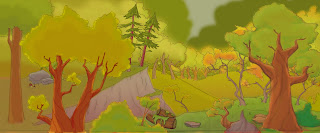
So the piece that Brittany was wondering about was actually a multiplane camera move from my student animated film. I wanted to somehow incorporate some animation into my show, because I had kind of been working on it for pretty much forever and I thought that maybe I should showcase it somehow. I took one of the few colored bits of my film, and because it is a multi layered animation background, I decided to make it into a multi layered piece of arty goodness. The first picture is the actual digital copy that I colored in photoshop. It in of itself is made up of probably at least a hundred different layers...

When I had printed out each layer I discovered that when they say transparency they really mean it, and you could see through each layer...

I decided to paint the back of each layer with white acrylic paint so that you wouldn't be able to see through the actual artwork. There were a lot of very tiny details, so this was definitely the part that took the longest amount of time.

I then broke out my super crafty powers and my secret weapon-fun foam. Using photo mounting squares I stuck a couple of squares together to add some thickness to them.

I then strategically placed them in between two of the layers so that they would be separated slightly.

I did it for each layer, and added extra squares at the top of the transparencies to help keep them straight.


When all of the layers were attached it looked a little something like this.

And the back looked a little something like this.

I placed a piece of white paper over the back to serve as the very bottom layer and the sky.

And then it looked like this!

I had a mat cut to cover the edges of the transparencies and to hide all of the foam squares.

I stuck it to the mat with more photo mounting squares and put a piece of black construction paper over the back to help block out any light that might come in from behind and show the foam squares. The frame that I had bought for it was actually a shadow box that had glass both in the front and the back, so if you were using a normal frame you probably wouldn't need the construction paper.

And here it is with the frame! (sorry for the blurry picture...)

I also made a paper version as a thank you card, but painting in all of the tiny branches was a whole lot easier than cutting them out with an exacto knife...

So the piece that Brittany was wondering about was actually a multiplane camera move from my student animated film. I wanted to somehow incorporate some animation into my show, because I had kind of been working on it for pretty much forever and I thought that maybe I should showcase it somehow. I took one of the few colored bits of my film, and because it is a multi layered animation background, I decided to make it into a multi layered piece of arty goodness. The first picture is the actual digital copy that I colored in photoshop. It in of itself is made up of probably at least a hundred different layers...

I printed each layer of the background out on multipurpose transparency film (which was freaking expensive by the way!). This is layer #2.

When I had printed out each layer I discovered that when they say transparency they really mean it, and you could see through each layer...
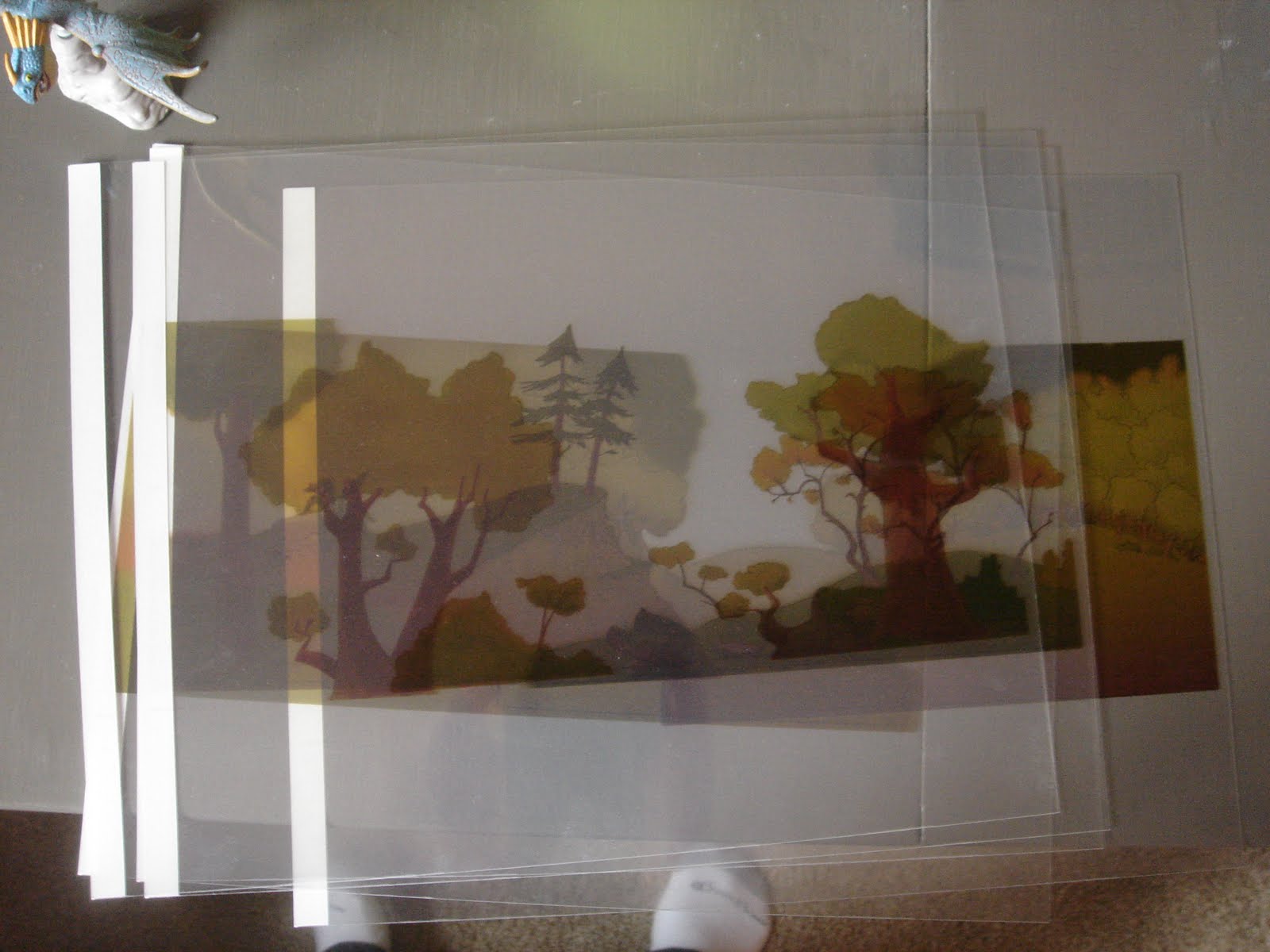
I decided to paint the back of each layer with white acrylic paint so that you wouldn't be able to see through the actual artwork. There were a lot of very tiny details, so this was definitely the part that took the longest amount of time.

I then broke out my super crafty powers and my secret weapon-fun foam. Using photo mounting squares I stuck a couple of squares together to add some thickness to them.

I then strategically placed them in between two of the layers so that they would be separated slightly.

I did it for each layer, and added extra squares at the top of the transparencies to help keep them straight.


When all of the layers were attached it looked a little something like this.

And the back looked a little something like this.

I placed a piece of white paper over the back to serve as the very bottom layer and the sky.

And then it looked like this!

I had a mat cut to cover the edges of the transparencies and to hide all of the foam squares.

I stuck it to the mat with more photo mounting squares and put a piece of black construction paper over the back to help block out any light that might come in from behind and show the foam squares. The frame that I had bought for it was actually a shadow box that had glass both in the front and the back, so if you were using a normal frame you probably wouldn't need the construction paper.

And here it is with the frame! (sorry for the blurry picture...)

I also made a paper version as a thank you card, but painting in all of the tiny branches was a whole lot easier than cutting them out with an exacto knife...

Sunday, August 1, 2010
Cannon!
Happy August!!! So another crazy huge project that I've been working on is my student film! I started it back at my old, old school and have been working on it on and off for almost 2 years. I'm finally getting to the point where some of the animation is getting cleaned up so I thought that I would post a very short scene from it! It still needs to be colored and stuff, but this is roughly what it will look like!
Subscribe to:
Posts (Atom)